BrightBuild SMS Consent CTA Proof
Last updated: April 6, 2026
Purpose
This page documents the exact call-to-action (CTA) wording and workflow used to collect SMS consent for BrightBuild project-coordination messaging.
This page is public and intended for carrier/Twilio compliance review.
Exact Consent Script (In Person or Phone)
Contractor asks:
"Would you like to receive SMS updates about your renovation project? Message and data rates may apply. You'll receive a text asking you to reply START to confirm. You can reply STOP at any time to opt out."
Step-by-Step Consent Process
- Contractor asks for permission using the exact script above during an existing project relationship (in person or by phone).
- If the recipient agrees, contractor adds the phone number in BrightBuild. BrightBuild records consent metadata for compliance, including recipient phone number, contractor identity, consent method (in person or phone), date/time of consent request, and recipient reply event (START/UNSTOP/STOP/HELP).
- BrightBuild sends one consent request SMS:
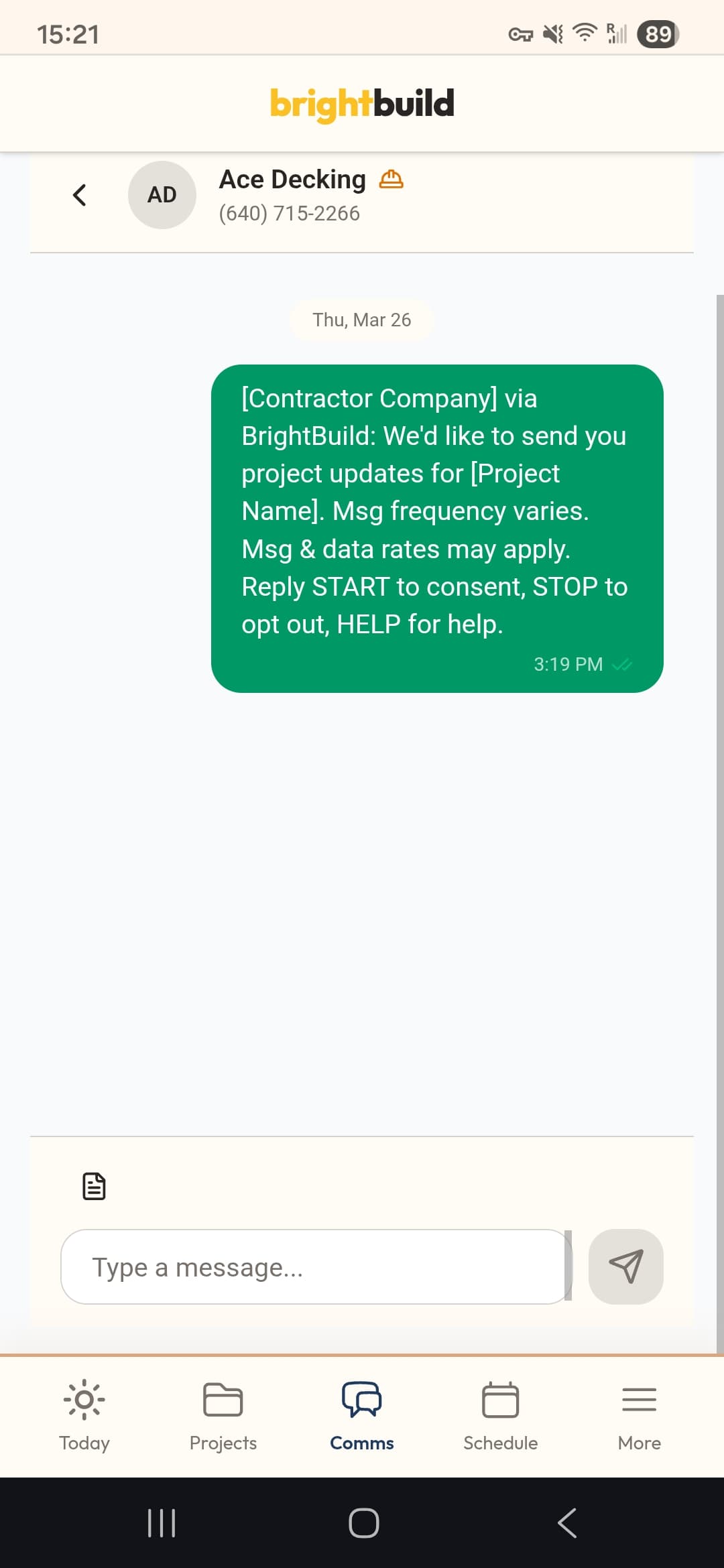
[Contractor Company] via BrightBuild: We'd like to send you project updates for [Project Name]. Msg frequency varies. Msg & data rates may apply. Reply START to consent, STOP to opt out, HELP for help. - Recipient must reply START (or UNSTOP where supported) to opt in.
- No project coordination SMS is sent until the START/UNSTOP confirmation is received.
- BrightBuild records opt-in, help, and opt-out events for compliance review and suppression.
Consent Request SMS (One-Time)
[Contractor Company] via BrightBuild: We'd like to send you project updates for [Project Name]. Msg frequency varies. Msg & data rates may apply. Reply START to consent, STOP to opt out, HELP for help.
Opt-In Confirmation Message
[Contractor Company] via BrightBuild: You are subscribed to project coordination updates. Msg frequency varies. Msg & data rates may apply. Reply HELP for help, STOP to opt out.
Screenshot Evidence (One-Time Consent Request SMS)
Carrier/Twilio Review Evidence
How to Use This Page in Campaign Registration
- Use this URL directly in the campaign "Proof page" field.
- Reference this URL in the campaign consent description as CTA evidence of the exact opt-in flow.
- Screenshot evidence is published on this page at https://www.brightbuild.app/screenshots/sms-consent-proof.png.
Related Policies
SMS Consent Details: https://www.brightbuild.app/sms-consent
Terms: https://www.brightbuild.app/terms
Privacy: https://www.brightbuild.app/privacy